Why not Buffer or Postiz?
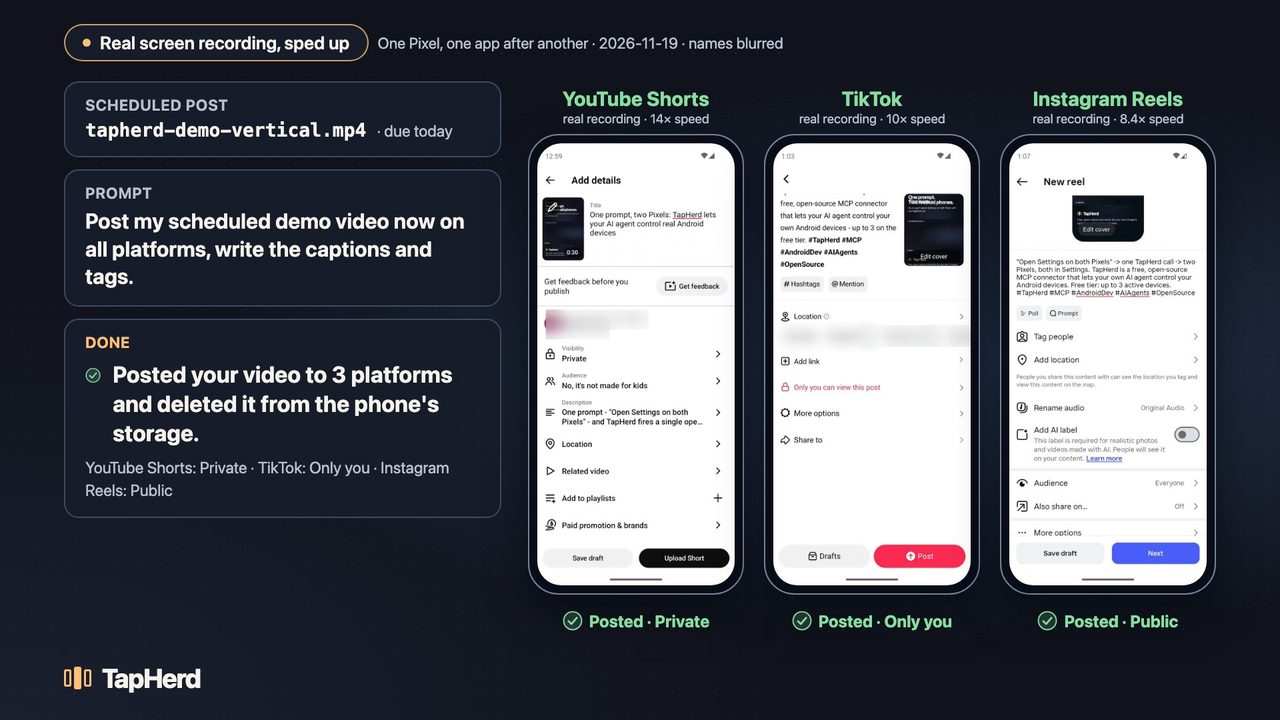
Scheduling tools can only do what each platform's API allows. For example, TikTok's posting API keeps posts private until an app passes TikTok's audit, and Instagram's API only supports Professional accounts. TapHerd works through the app itself, on your own phone.
Is my data sent anywhere?
The free version runs entirely on your machine and has no telemetry. Your Android apps and your AI client handle their own network requests. Privacy
Will this get my accounts banned?
Platforms set their own rules. You're responsible for following them; see Acceptable Use. TapHerd only automates posting to accounts you own.
Does it work on Windows?
Yes, in beta. The automated tests pass on Windows, and there's an installer. Real-device testing on Windows is still to come. Windows setup guide
Is it a phone farm tool?
No. TapHerd doesn't create accounts or automate engagement. It helps you operate your own devices and accounts with AI.
Does it work on iPhone?
No. TapHerd is Android only. iOS doesn't allow this kind of control.
How do I get the Android emulators?
They're free from Google. Install Android Studio, open Device Manager, and create a Pixel device with a Google Play system image. Setup guide
What can I automate?
Post to accounts you own, test your own apps, and use your own devices. TapHerd's recipes and scheduler only support posting. Generic controls are subject to the acceptable use policy.
- Don't create, register, or verify accounts.
- Don't automate likes, follows, comments, direct messages, views, or other engagement.
- Don't scrape other people's data or solve CAPTCHAs.
- Don't spoof device fingerprints, evade emulator detection, rotate proxies, or hide automation.
Is it open source? What will Pro cost?
The free connector is MIT-licensed. Pro pricing isn't set yet. People on the waitlist get founder pricing.