Your AI can now use Android apps.
Control your phones and emulators from Codex, Claude, or Cursor. Post to TikTok, Reels and Shorts in one prompt. Free for up to 3 devices.
>Post my scheduled video to TikTok, Reels and Shorts, and write the captions.
Built for developers and technical creators. You need a computer with an Android emulator or an Android phone.
Demo video coming soon
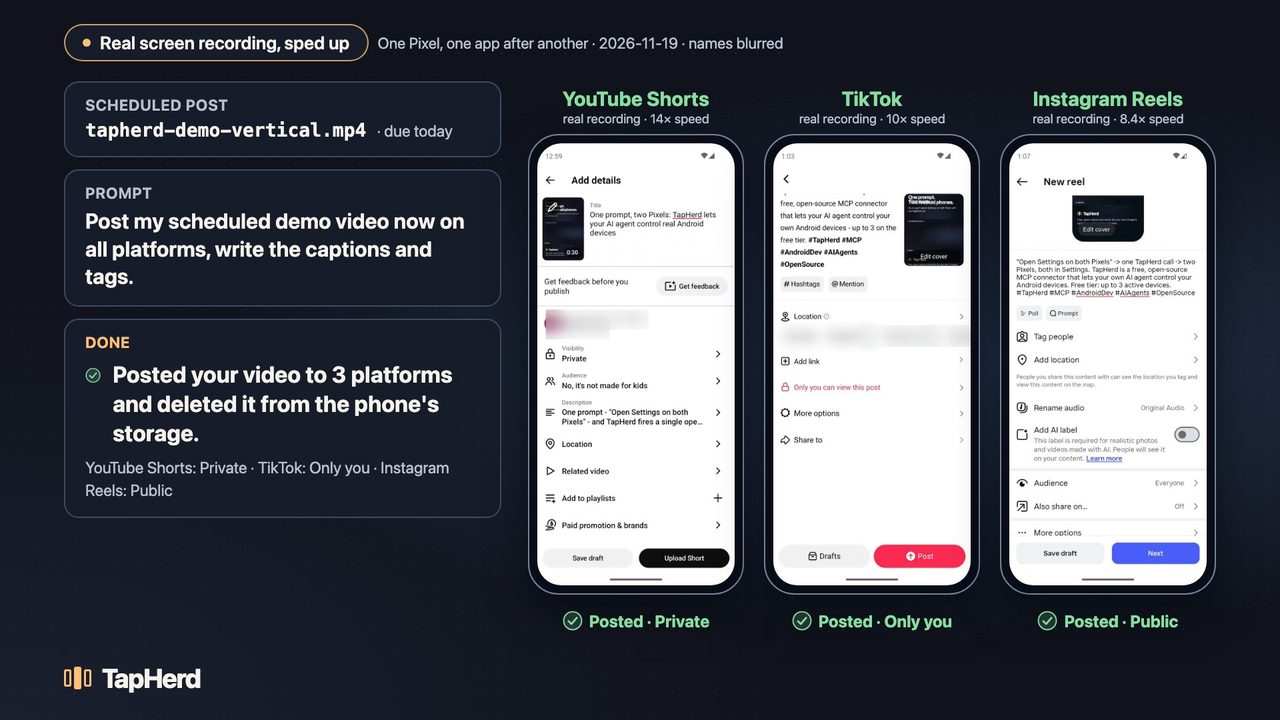
One prompt posted a scheduled video from one Pixel emulator to three platforms on 2026-11-19. Account names are blurred. The video plays from Loom only after you press play.
Video description
- The scheduled post is a TapHerd demo video, due today.
- The prompt “Post my scheduled demo video now on all platforms, write the captions and tags.” goes to Claude Code.
- Using TapHerd, the agent copies the video from the computer to the phone and opens each app.
- It writes a caption and tags for each platform, sets YouTube Shorts to Private and TikTok to Only you, and posts a public Instagram Reel.
- It deletes its copy of the video from the phone's storage.
Three steps, about five minutes
Install
One line for macOS and Linux:
curl -LsSf https://raw.githubusercontent.com/GreenPeaas/tapherd/main/scripts/install.sh | shOn Windows, in PowerShell:
irm https://raw.githubusercontent.com/GreenPeaas/tapherd/main/scripts/install.ps1 | iexConnect your AI
Print the config for your client and paste it where TapHerd says.
tapherd config mcp --client claude-codeAlso codex, claude-desktop, and cursor. Exact steps
Ask it to do the work
“Post my scheduled video to TikTok, Reels and Shorts, write the captions, and keep the Short private.”
Your AI sees each screen, taps, types, and reports back.
Not a developer? Run the installer, then start an Android emulator using the setup guide, and connect Claude Desktop. Cloud phones with ADB access should work through tapherd connect, but haven't been tested yet. macOS: tested · Windows and Linux: beta.
What people use it for
Posting
Post to TikTok, Reels and Shorts from your own phones, with captions your AI writes. The same tools work in other apps, such as X and YouTube.
QA testing
Let an agent walk through your Android app on several emulators at once.
Store screenshots
Capture the same screens on several devices for your app store listing.
Mobile-only apps
Use apps that have no web or API version.
Your own analytics
Read numbers from your own accounts' in-app dashboards.
Your AI gets 15 tools, including read_screen, tap, type_text, open_app_many, push_media, and remove_media. All tools
Run your whole fleet from one dashboard.
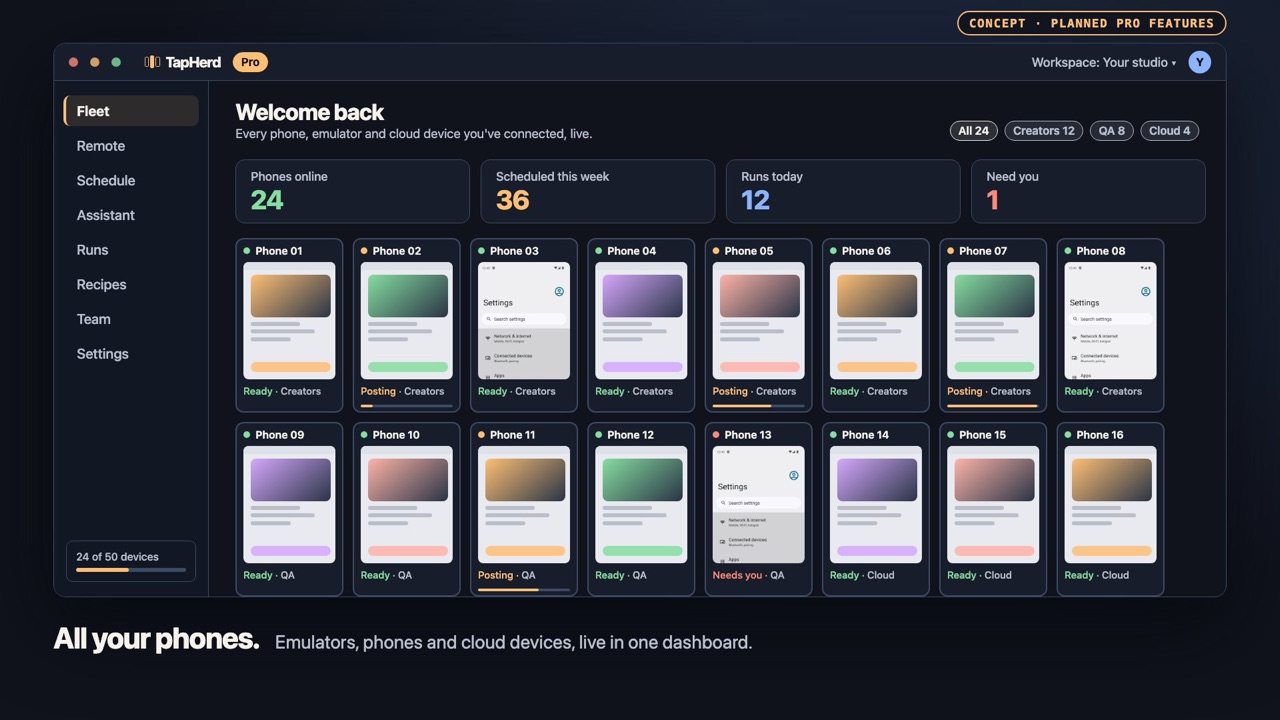
Free gets your AI onto three phones. Pro is for creators and teams who run many more: every phone live in your browser, posts scheduled across all of them, and an assistant that already knows your devices.
Every phone, live
See all your emulators, phones and cloud devices in one dashboard, grouped the way you work.
Control from your browser
Click to tap, scroll to swipe, type from your keyboard. Do it once and mirror it to a whole group.
Scheduled posting
Plan the week across every phone. Drag to reschedule; each phone posts on time on its own.
Built-in assistant
Ask in plain English. It plans the posts, drafts captions for each platform, and fills the schedule.
Maintained recipes
Posting recipes kept up to date as apps change, with a clean handoff to your AI when a screen is new.
50+ devices
Go past Free's three devices. Team seats, run history, and alerts when a phone needs you.
Concept video coming soon
Be first in line.
Pro isn't available yet. Waitlist members get:
- Founder pricing
- Early access before the public launch
- A say in which features ship first
Free & Pro
The local connector is free and MIT-licensed. Pro is coming soon for creators and teams who post across more phones.
| Feature | Free | Pro · coming soon |
|---|---|---|
| Active devices | Up to 3 | 50+ |
| AI control of Android apps | Yes | Yes |
| Posting recipes | 1 unverified sample | Maintained recipe library |
| Scheduling | Run on demand | Scheduled posting |
| Dashboard & browser control | — | Planned |
| Built-in assistant | Use your own AI client | Planned |
Join the Pro waitlist
Get one email when early access opens. People on the waitlist get founder pricing and early access.
Email signup opens once the signup endpoint is configured.
FAQ
Why not Buffer or Postiz?
Scheduling tools can only do what each platform's API allows. For example, TikTok's posting API keeps posts private until an app passes TikTok's audit, and Instagram's API only supports Professional accounts. TapHerd works through the app itself, on your own phone.
Is my data sent anywhere?
The free version runs entirely on your machine and has no telemetry. Your Android apps and your AI client handle their own network requests. Privacy
Will this get my accounts banned?
Platforms set their own rules. You're responsible for following them; see Acceptable Use. TapHerd only automates posting to accounts you own.
Does it work on Windows?
Yes, in beta. The automated tests pass on Windows, and there's an installer. Real-device testing on Windows is still to come. Windows setup guide
Is it a phone farm tool?
No. TapHerd doesn't create accounts or automate engagement. It helps you operate your own devices and accounts with AI.
Does it work on iPhone?
No. TapHerd is Android only. iOS doesn't allow this kind of control.
How do I get the Android emulators?
They're free from Google. Install Android Studio, open Device Manager, and create a Pixel device with a Google Play system image. Setup guide
What can I automate?
Post to accounts you own, test your own apps, and use your own devices. TapHerd's recipes and scheduler only support posting. Generic controls are subject to the acceptable use policy.
- Don't create, register, or verify accounts.
- Don't automate likes, follows, comments, direct messages, views, or other engagement.
- Don't scrape other people's data or solve CAPTCHAs.
- Don't spoof device fingerprints, evade emulator detection, rotate proxies, or hide automation.
Is it open source? What will Pro cost?
The free connector is MIT-licensed. Pro pricing isn't set yet. People on the waitlist get founder pricing.